You made the song.
Now give it a singer.
Your Suno track becomes a real music video: an invented singer who actually sings your words, filmed from several camera angles, cut on your own phrasing.
Free Mac app · You pay rendering providers directly · No subscription
Why are two accounts required?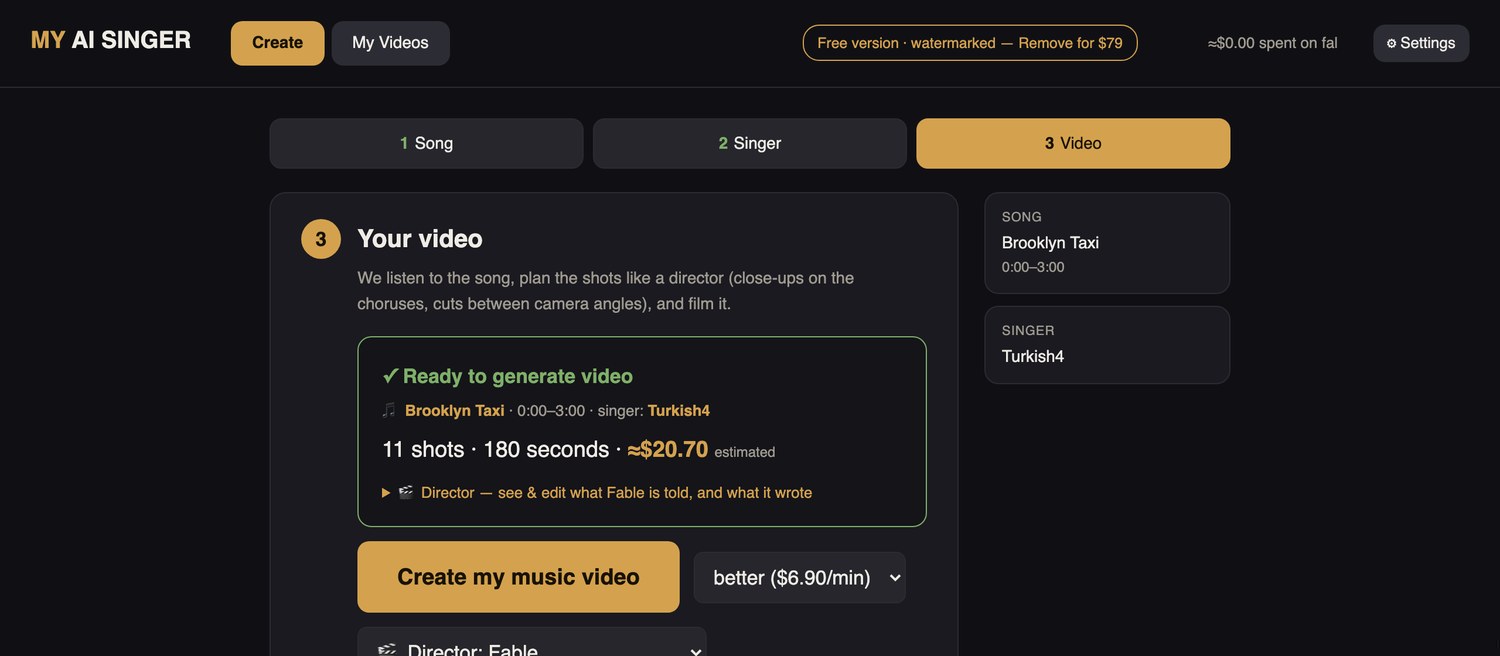
The app quotes the exact cost before it spends anything.
Complete videos, not trailers
Every singer here was invented by the app — none of them exist. The songs were written in Suno. Turn the sound on: the point is the mouth matching the words.
The second and third are the same song written twice in Suno — once with a male vocal, once female. Two people who don't exist, each singing their own take of it.
Three things you do. The rest is automatic.
-
STEP 01
Add your song
Upload an MP3 or WAV — Suno exports work as-is — and choose the part you want to film with the built-in player.
-
STEP 02
Create or pick your singer
Describe a performer in a sentence, or upload a portrait you already made. The app builds the camera angles it needs.
-
STEP 03
See the price, then create
The app shows the shot plan and the exact rendering cost, and waits for you to confirm before anything is charged.
What the app handles automatically
Separates the voice
Pulls the vocal out of your mix so the mouth follows the singer, not the drums.
Finds the cut points
Locates phrase ends and breaths, and puts the cuts where a real editor would.
Directs and films
Writes a performance for each shot from your actual lyrics, then films them one by one.
Reassembles in sync
Joins the shots and lays your full song back over the top. You get one finished MP4.
See everything happening behind the scenes
The full sequence, in order, for anyone who wants it:
- Your song is split in two. A voice-only track and everything else. Takes a couple of minutes the first time you use a song, then it's remembered.
- The vocal is transcribed. The app writes out what's being sung and when, so the director knows the words at every moment.
- The shots are planned from the music. Phrase ends and breaths become cut points. Loud, high passages get a side angle, because strain reads better in profile than head-on. Quiet lines get a close-up.
- A director writes each shot. It reads your lyrics for that exact moment and writes what the performer does — where they look, when they lean in, when they pull the mic away on a big note.
- Each shot is filmed separately. Your singer's picture and the voice-only audio go to the rendering service, one shot at a time. This is the part that costs money.
- The shots are joined on the planned timings and your complete mix — voice, drums, everything — is laid back over the result.
- Every take is saved. Change one shot and only that shot is re-filmed; the rest are reused free. You never pay for the whole video twice.
It sings in whatever language your song is in
The lip-sync listens to the sound of your vocal, so there is no language to pick and nothing to configure. The director does read your words — it transcribes your lyrics so the performance fits the moment — but nothing is translated or rewritten.
Both of these are Turkish, the same song sung by two different invented singers.
Two free accounts, and why you need them
The app is free and runs on your own Mac, but it can't do the heavy work itself. Two services do that, and you pay them directly — nothing reaches us. Setting them up takes about five minutes, once.
fal.ai
Making one second of realistic singing video needs a graphics card more expensive than a car. fal.ai rents you one by the second. Add $10 to start; the app sends your singer's picture and the voice track, and the finished shot comes back a few minutes later.
You pay fal directly, at their published rate. We don't mark it up. That's why the app can be free.
Anthropic
Somebody has to decide what happens in each shot, or you get a person staring into the lens for three minutes. The app uses Claude to read your lyrics and write the performance for each shot.
This costs roughly one cent for an entire video — the cheapest part of the process, and the difference between a video and a photo that moves.
What exactly is an API key?
An API key is a long line of letters and numbers that acts as a password letting one program use another company's service on your behalf.
Think of it as a membership card you hand to the app. When the app needs a video rendered, it shows that card, the work gets done, and the bill goes to your account — not to us. You copy the key from the website once and paste it into the app once.
You can cancel or replace it at any time from the same website, and the app immediately stops being able to spend anything. We never see your key. It's stored on your own computer, and the app runs entirely there.
Both accounts are free to open. You only pay for what you actually use, you set your own spending limits on their websites, and the app quotes every render before it starts.
Why does the voice have to be separated from the music?
Short version: the app isolates the vocal before filming so the mouth follows the singer, not the drums or the instruments. This happens automatically.
The longer answer is worth knowing, because it's the most common reason a first attempt at AI lip-sync looks wrong.
When Suno gives you a song, it's one file with everything mixed together — voice, drums, bass, guitar, reverb. To your ears that's just a song. To a lip-sync model it's a problem, because the model's entire job is to look at a sound and decide what shape a mouth makes to produce it.
Hand it the full mix and it tries to make a mouth shape for the snare drum. The result is a face that mumbles and chews between the actual words — the uncanny thing you've probably seen and couldn't name.
So the app splits your song in two first: a voice-only track, and everything else. Only the voice goes to the renderer. Once the video comes back, your complete song is laid over the top. The video is synced to the voice; you hear the whole record.
There's no button and no setting for this. It's simply why the very first render of a new song takes a couple of extra minutes.
The app is free. The rendering isn't — and it isn't ours.
Real numbers, rather than a pricing page that hides them. These are paid to fal.ai and Anthropic directly, at their rates:
| What | Who you pay | Typical cost |
|---|---|---|
| Creating a singer (3 images) | fal.ai | ≈ $0.63 |
| The director writing every shot | Anthropic | ≈ $0.01 |
| Filming — 30 second video | fal.ai | ≈ $3.50 |
| Filming — 3 minute video | fal.ai | ≈ $20 |
| Re-filming one shot you didn't like | fal.ai | ≈ $1–2 |
| The app itself | — | Free |
These prices are set by fal.ai and Anthropic, not by us, and can change. The app always quotes the exact cost before it spends anything, and shows a running total of what you've spent.
Free forever
- every feature, no limits
- unlimited videos
- a small myaisinger.com mark in the corner of exports
Remove the watermark — $79 once
- clean exports from then on
- every video you already made is rebuilt clean, free
- the app is otherwise identical
Download it and make one tonight
The app is free, it runs on your own Mac, and it walks you through both accounts on first launch. Make one video and you'll know within an hour whether this is for you.
macOS 11 or later, Apple Silicon or Intel. About 61 MB.
First launch: right-click the app and choose Open, then Open again. macOS shows a one-time notice because we're an independent developer rather than the App Store. That's the whole install.
Windows version is in progress.